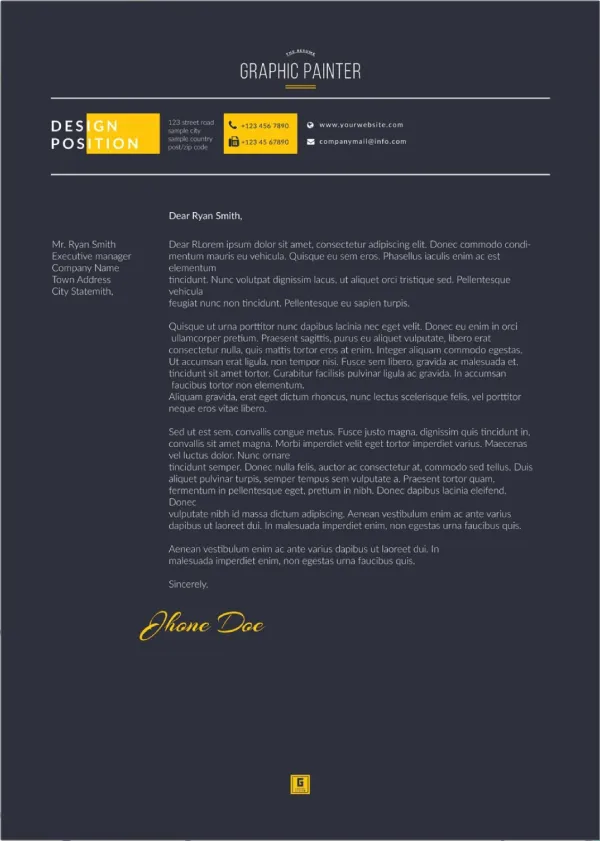
Crafting a Compelling Job Cover Letter
A well-crafted job cover letter is your first chance to make a positive impression on a potential employer. It’s more than just a formality; it’s a powerful tool to introduce yourself, highlight your skills, and express your enthusiasm for the position. With the right job cover letter template Word, you can streamline the process and create a document that grabs attention. This guide will walk you through everything you need to know to write a compelling cover letter using Word templates, maximizing your chances of landing an interview.
Understanding the Purpose of a Cover Letter
Before diving into the specifics, it’s crucial to understand the purpose of a cover letter. Unlike your resume, which provides a snapshot of your experience, a cover letter allows you to tell a story. It’s your opportunity to connect your skills and experience to the specific requirements of the job. It demonstrates your understanding of the company and the role, and it showcases your personality and communication skills. A well-written cover letter can significantly increase your chances of getting noticed and securing an interview. Therefore, understanding the goal of a cover letter is crucial for making a lasting impression with potential employers.
Key Components of a Cover Letter

A strong cover letter is structured with several key components. Each element plays a vital role in presenting you as a qualified candidate. Understanding each section will help you create a comprehensive and effective document.
Contact Information
Start with your contact information at the top of the letter. Include your name, address, phone number, and email address. This ensures the hiring manager can easily reach you. Match the formatting used in your resume for a consistent professional look.
Salutation
Address the hiring manager by name whenever possible. Research the company website or LinkedIn to find the hiring manager’s name. If you can’t find a specific name, use a professional greeting such as “Dear Hiring Manager” or “Dear [Department Name] Team.”
Opening Paragraph

Capture the reader’s attention in the opening paragraph. State the position you’re applying for and where you found the job posting. Briefly mention why you’re interested in the role and the company. This is your chance to make a strong first impression and get the reader engaged.
Body Paragraphs
The body paragraphs are where you highlight your relevant skills, experience, and accomplishments. Use specific examples to demonstrate how you meet the job requirements. Tailor each paragraph to the specific role, showing how your skills align with the company’s needs. Quantify your achievements whenever possible to make a more compelling case for your candidacy. For example, “Increased sales by 15% in one quarter.”
Closing Paragraph
In the closing paragraph, reiterate your interest in the position and the company. Thank the hiring manager for their time and consideration. Include a call to action, such as stating that you look forward to hearing from them or that you are available for an interview. End with a professional closing like “Sincerely” or “Best regards,” followed by your name.
Formatting Your Cover Letter in Word

Word offers numerous templates to help you create a professional-looking cover letter. Utilizing these templates can save you time and ensure a polished presentation. Here’s how to get started and make the most of Word’s features.
Choosing the Right Template
Word provides a variety of cover letter templates to choose from, catering to different styles and needs. Consider your industry, the company culture, and your personal preference when selecting a template. Aim for a clean, modern design that is easy to read. Avoid overly complex templates that might distract from your content. Choosing the right template can help you make a great first impression and communicate your message effectively. Before you start filling out your cover letter, take the time to explore the available templates and pick the one that best suits your needs and style.
Accessing Templates in Word
Accessing Word templates is easy. Open Microsoft Word and go to “File” > “New.” In the search bar, type “cover letter” to browse available templates. You can filter your search by categories like “Professional,” “Modern,” or “Creative” to narrow your options. Select a template that appeals to you and click “Create.” Word will then open the template, ready for you to customize with your information.
Customizing Your Template

Once you’ve chosen a template, the real work begins customizing it to reflect your unique qualifications. Replace the placeholder text with your information, including your contact details, the hiring manager’s name, and the company’s address. Adapt the template’s structure to fit your content. You can add or remove sections as needed to match your skills and experience with the job requirements. Make sure to personalize the template to reflect your brand. This is an opportunity to showcase your personality and create a cover letter that is truly unique.
Font Selection and Formatting
Choose a professional and readable font, such as Times New Roman, Arial, Calibri, or Helvetica. Keep the font size consistent throughout the document, typically between 10 and 12 points. Use bolding, italics, and underlining sparingly to highlight key information. Ensure your formatting is consistent throughout the document, making it visually appealing and easy to read.
Margins and Spacing
Maintain standard margins (typically 1 inch on all sides) to provide adequate white space. Use single or 1.15 line spacing for readability. Proper spacing and margins make your cover letter look organized and professional, improving the overall presentation. Adjusting these settings ensures your cover letter is clean and inviting.
Content is King Writing Effective Content

The content of your cover letter is paramount. It’s not enough to have a well-formatted document; you need compelling content that showcases your skills and makes a strong impression. Here’s how to write content that gets results.
Highlighting Your Skills and Experience
Focus on the skills and experience that align with the job requirements. Review the job description carefully and identify the key qualifications the employer is seeking. Then, in your cover letter, provide specific examples of how you have demonstrated those skills in past roles. Use action verbs to describe your accomplishments and quantify your achievements whenever possible. Show, don’t just tell, the hiring manager why you are a good fit for the role.
Tailoring Your Letter to the Job
Avoid sending a generic cover letter. Tailor each letter to the specific job and company. Research the company and the role to understand their needs and expectations. Address the hiring manager by name and mention the specific job title. Customize your content to address the specific requirements outlined in the job description. Demonstrate your understanding of the company’s mission, values, and goals. Showing you care enough to customize your letter helps you stand out from other candidates.
Using Action Verbs

Use strong action verbs to describe your accomplishments and responsibilities. Action verbs help to make your cover letter more dynamic and engaging. Examples include “managed,” “led,” “developed,” “implemented,” “achieved,” “created,” and “improved.” Action verbs help to showcase your abilities and provide a more effective presentation.
Proofreading and Editing
Proofreading and editing are critical steps in the cover letter writing process. A single typo or grammatical error can undermine your credibility and negatively impact your chances. Take your time and be meticulous in your review.
Common Mistakes to Avoid
Avoid common mistakes that can detract from your cover letter. These include typos and grammatical errors, generic content, and not tailoring your letter to the specific job. Do not exceed one page in length. Avoid using overly formal language or jargon. Proofread carefully for any errors.
Seeking Feedback

Ask a friend, family member, or career counselor to review your cover letter. A fresh pair of eyes can catch errors you might have missed. They can also provide valuable feedback on the content, clarity, and overall effectiveness of your letter. Consider asking someone with hiring experience to review your letter. Constructive feedback can help you refine your letter and increase your chances of success.