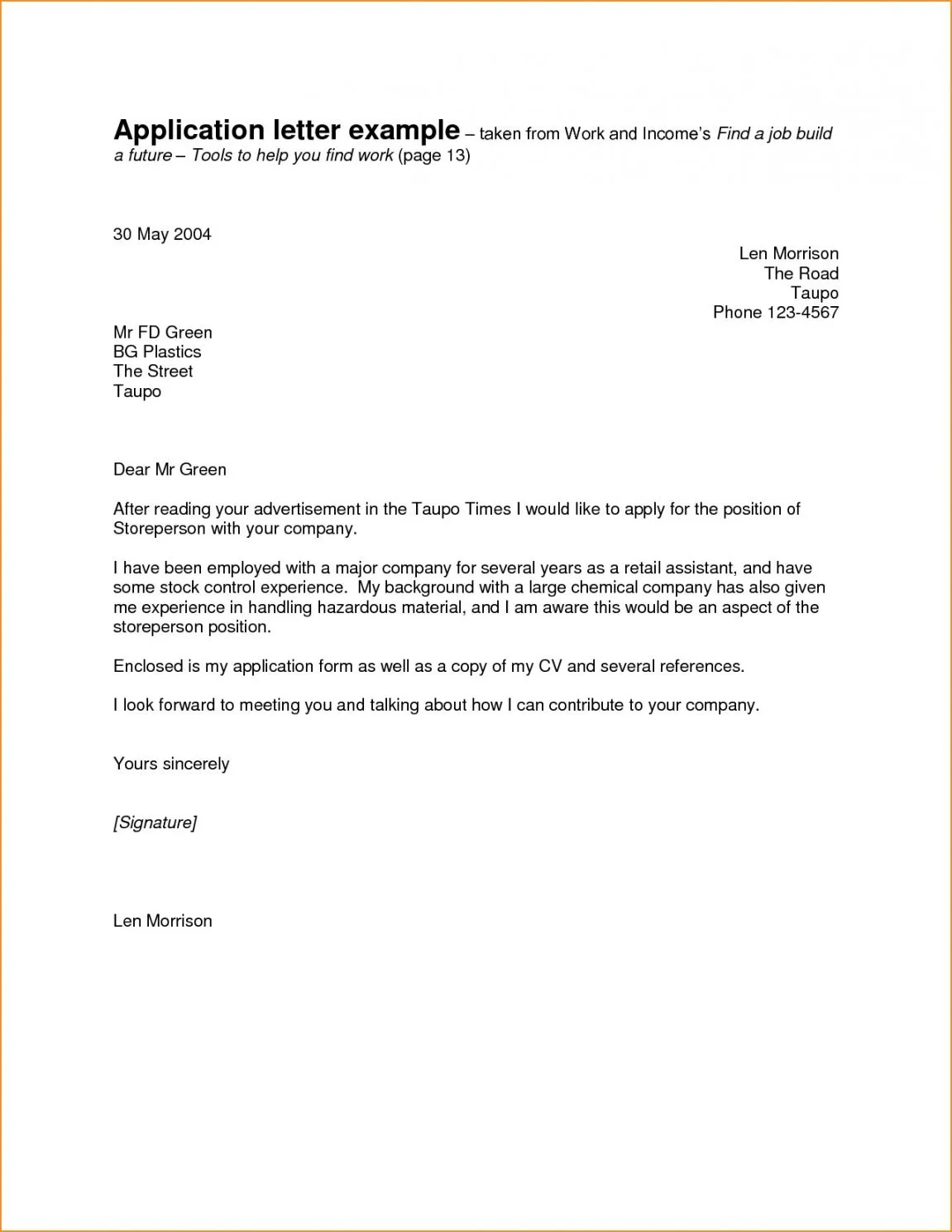
Understanding the Email Cover Letter
In the modern job market, an email cover letter has become a standard component of the application process. It’s the first impression you make on a potential employer, so it’s essential to get it right. Unlike a traditional cover letter sent as a separate document, an email cover letter is written directly in the body of the email. This immediate presentation requires you to be concise, clear, and impactful. The goal is to capture the reader’s attention immediately and convince them to review your attached resume or consider you for an interview. A well-crafted email cover letter is not just a formality; it’s your opportunity to stand out and showcase your personality and qualifications.
Why is an Email Cover Letter Important?
An email cover letter is crucial for several reasons. First, it provides context to your resume. While your resume lists your skills and experience, the cover letter explains how those skills align with the specific job requirements and your career goals. It allows you to tailor your application to the employer’s needs and demonstrate your genuine interest in the role and the company. Second, it’s an opportunity to showcase your communication skills. Your writing style, tone, and ability to articulate your value proposition can significantly influence the hiring manager’s decision. Finally, it shows that you’ve taken the time to personalize your application, which indicates your attention to detail and your commitment to securing the position. A strong email cover letter can significantly increase your chances of getting your resume read and receiving an interview invitation. (job-application-tips)
Key Differences Between a Traditional and Email Cover Letter

Although both serve the same purpose, traditional and email cover letters differ in their format and approach. A traditional cover letter is formatted as a formal document, typically with a heading that includes your contact information, the date, and the recipient’s information. The body is often longer and more detailed, allowing for a more in-depth explanation of your qualifications. An email cover letter, on the other hand, is more concise. It should be brief and to the point, as the hiring manager is likely to be reading it on a screen. Formatting is key, using short paragraphs and clear language. The focus is on grabbing attention quickly and directing the reader to your resume. While a traditional cover letter might include a full-page narrative, the email version is more of a teaser, designed to entice the reader to learn more by reviewing your attached resume.
Structuring Your Email Cover Letter for Success
A well-structured email cover letter is crucial for making a positive impression. Begin with a compelling subject line that clearly states the job title and your name. Next, use a professional greeting, such as “Dear Mr./Ms. [Last Name].” The opening paragraph should immediately grab the reader’s attention by stating the position you’re applying for and briefly highlighting your most relevant qualifications or experience. In the body of the email, briefly explain how your skills and experience align with the job requirements. Quantify your achievements whenever possible, using numbers and data to showcase your impact. Conclude with a call to action, such as requesting an interview and thanking the hiring manager for their time and consideration. Proofread the entire email carefully before sending it to ensure there are no grammatical errors or typos.
The Subject Line Grab Attention
The subject line is the first thing a hiring manager sees, and it determines whether your email gets opened. A generic subject line like “Job Application” is unlikely to stand out. Instead, be specific and concise. Include the job title and your name to ensure the hiring manager knows what the email is about and who it’s from. Consider using keywords from the job description to further increase the chances of your email being noticed. For example, “Software Engineer Application - John Doe” or “Application for Marketing Manager - Jane Smith.” Avoid using vague or overly creative subject lines that might confuse the reader. The goal is to make it easy for the hiring manager to identify your application and prioritize it among the many emails they receive. (email-subject-line)
Crafting a Compelling Opening

Your opening paragraph sets the tone for your entire email cover letter. It should immediately capture the reader’s attention and make them want to continue reading. Start by clearly stating the position you’re applying for and how you learned about the opportunity. If you were referred by someone, mention their name. Then, briefly highlight your most relevant qualifications or experience. Focus on what makes you the ideal candidate for the job. Tailor your opening to the specific job description and the company’s values. Show enthusiasm and a genuine interest in the role. Avoid generic opening lines, such as “I am writing to express my interest.” Instead, aim for a more personalized approach that demonstrates your understanding of the company and the position. For example, “I am excited to apply for the Marketing Manager position, as I believe my experience in digital marketing aligns perfectly with your company’s growth strategy.”
Highlighting Your Relevant Skills and Experience
The body of your email cover letter is where you showcase your skills and experience. Select the skills and experiences most relevant to the job requirements. Refer back to the job description and identify the key qualifications the employer is seeking. Provide concise examples of how you’ve demonstrated those skills in the past. Use action verbs to describe your accomplishments and avoid simply listing your responsibilities. Instead, focus on what you achieved and the results you delivered. For instance, instead of saying “Managed social media accounts,” say “Increased social media engagement by 30% within six months.” By highlighting your relevant skills and experience, you demonstrate that you’re a strong fit for the position and increase your chances of getting an interview. (skills-and-experience)
Quantifying Your Achievements
Quantifying your achievements is a powerful way to demonstrate your value to a potential employer. Instead of simply stating that you’re a good communicator, provide concrete examples and data to back it up. Use numbers, percentages, and specific metrics to illustrate your impact. For example, instead of saying “Improved customer satisfaction,” say “Increased customer satisfaction scores by 15%.” Whenever possible, quantify your achievements to make them more impactful and memorable. This is a critical step to make you stand out, as it allows the hiring manager to understand the tangible results you’ve delivered in previous roles. By using specific data, you provide concrete evidence of your skills and abilities and show that you’re a results-oriented professional.
Demonstrating Your Enthusiasm for the Role

Showing enthusiasm for the role and the company is critical to make a positive impression. Research the company and the specific job description to understand what they are looking for in a candidate. Tailor your cover letter to reflect your understanding of the company’s mission, values, and goals. Explain why you’re excited about the opportunity and how you believe your skills and experience can contribute to the company’s success. Express your genuine interest in the role, and what specifically attracts you to the position and the company. Mention any specific projects or initiatives that you’re particularly interested in. By demonstrating your enthusiasm, you show the hiring manager that you are genuinely invested in the opportunity and are more likely to be a dedicated and engaged employee.
Writing a Strong Call to Action
Your call to action should encourage the hiring manager to take the next step. In the closing paragraph, reiterate your interest in the position and express your desire for an interview. Make it easy for the hiring manager to contact you. Include your phone number and email address, but avoid stating the obvious like “Please contact me.” End with a professional closing, such as “Sincerely,” or “Best regards,” followed by your full name. Make sure your call to action is clear, concise, and professional. A strong call to action increases your chances of getting an interview, as it prompts the hiring manager to take the next step in the hiring process. By including these key pieces of information, you make it easy for the hiring manager to take the next step and invite you for an interview.
Formatting Your Email for Readability
Formatting is crucial for ensuring your email cover letter is easy to read. Use short paragraphs and clear, concise language. Avoid long blocks of text that can be overwhelming for the reader. Use bullet points to highlight key accomplishments and skills. This breaks up the text and makes it easier to scan. Leave space between paragraphs to improve readability. Ensure your font is easy to read and the font size is appropriate. The goal is to make your email as reader-friendly as possible. A well-formatted email cover letter demonstrates your attention to detail and professionalism, making it more likely that the hiring manager will read your entire email. Clean formatting ensures that the reader can easily find the important information.
Choosing the Right Font and Font Size

The font you choose for your email cover letter can impact readability and professionalism. Opt for standard, professional fonts like Arial, Calibri, or Times New Roman. Avoid overly decorative or unusual fonts that can be distracting or difficult to read. The font size should be easy to read without being too large or too small. A font size of 11 or 12 points is generally recommended. Be consistent with your font choices throughout the entire email. Ensuring that your email is easy to read from a formatting perspective will significantly increase the chance that your email is reviewed. (cover-letter-formatting)
Proofreading and Editing Your Cover Letter
Before sending your email cover letter, carefully proofread and edit it for any errors. Check for typos, grammatical errors, and punctuation mistakes. Read your email aloud to catch any awkward phrasing or sentences. Make sure that your tone is professional and appropriate for the job and the company. Ask a friend or family member to proofread your email for a fresh perspective. Ensure that the email is concise and to the point, and that it clearly communicates your qualifications and enthusiasm. A polished and error-free cover letter demonstrates your attention to detail and your commitment to the application process. A poorly written cover letter with mistakes can immediately disqualify you.
Common Mistakes to Avoid in Email Cover Letters
Several common mistakes can undermine your email cover letter. Avoid using generic templates that are not tailored to the specific job or company. Do not simply restate your resume; instead, highlight your most relevant skills and experiences. Avoid lengthy paragraphs or complex language; keep your writing clear, concise, and to the point. Do not include irrelevant information or personal details that are not related to the job. Avoid sending the email without proofreading it for errors. Avoid using unprofessional email addresses; use a professional email address that includes your name. By avoiding these common mistakes, you’ll increase your chances of creating an effective email cover letter that impresses the hiring manager.
Sending Your Email Cover Letter Effectively

When sending your email cover letter, pay attention to the details. Use a professional email address. Address the hiring manager by name, if possible. Double-check that you’ve attached your resume and any other required documents. If the job posting provides instructions for submitting your application, follow those instructions carefully. Send your email at a time when the hiring manager is likely to be checking their email, such as during business hours. Send a test email to yourself to ensure that the formatting and attachments appear correctly. By sending your email effectively, you show that you are organized, professional, and committed to the application process.
Attaching Your Resume and Other Documents
When attaching your resume and other documents, make sure they are in a professional format, such as a PDF file. Name the files clearly, using your name and the document type (e.g., “John Doe Resume.pdf”). Verify that all attachments are included and are accessible. If you are including a cover letter, ensure that it aligns with the body of your email. Always attach your resume, even if the job posting doesn’t explicitly request it. Consider attaching a portfolio or other supporting documents if they are relevant to the job. By including all of the necessary information, you ensure the hiring manager has all the resources to evaluate your application. (resume-attachment)
Following Up After Submitting Your Application
After submitting your application, it’s acceptable to follow up to express your continued interest. Send a polite follow-up email one to two weeks after submitting your application if you haven’t heard back. In your follow-up, reiterate your interest in the position and express your enthusiasm for the opportunity. Briefly mention your qualifications and any new information that might be relevant. Keep it concise and professional. If the job posting specifies a preferred method of contact, follow those instructions. Do not overwhelm the hiring manager with multiple follow-up emails or calls. A well-timed and professional follow-up can show your continued interest in the role, but avoid being overly persistent. (follow-up-email)