Crafting the Perfect Subject Line
The subject line is the first impression you make when emailing a cover letter, and it plays a crucial role in whether your email gets opened or ends up in the trash. A well-crafted subject line is concise, professional, and clearly indicates the purpose of the email. It should immediately inform the recipient about the content of your email and the job you’re applying for. Avoid generic subject lines like “Cover Letter” or “Job Application.” Instead, personalize it by including the job title and your name. This immediately helps the hiring manager identify the application’s context. For instance, a subject line like “Application for Software Engineer Position - John Doe” is much more effective than a generic one. Remember to keep it brief and easy to understand to ensure it’s easily readable on various devices. The goal is to make it easy for the recipient to quickly understand the email’s purpose and prioritize it accordingly.
Why Subject Lines Matter
Subject lines are the gatekeepers of your email, influencing whether your cover letter is even seen. In a hiring manager’s inbox, filled with dozens or even hundreds of applications, a compelling subject line is what makes yours stand out. It’s a quick glimpse into the email’s content, giving the recipient a reason to open it. A clear, concise subject line allows the hiring manager to quickly sort and prioritize emails, ensuring your application doesn’t get lost in the shuffle. A poorly written or vague subject line could lead to your email being overlooked, deleted, or, at worst, perceived as unprofessional. Effective subject lines improve your chances of your cover letter being read, and thereby boost your likelihood of getting an interview. Essentially, the subject line is a small but powerful tool in your job search toolkit, providing immediate context and encouraging the recipient to learn more about your qualifications.
Tips for an Engaging Subject Line

To create an engaging subject line, use a combination of clarity, personalization, and professionalism. Begin by including the specific job title you are applying for to ensure the hiring manager knows what position you are interested in. Follow this with your name to make it easily identifiable. Consider incorporating a keyword related to the company or the role to grab their attention further. For example, if you’re applying for a marketing role at a tech company, you might include a relevant tech term or a marketing strategy. Avoid generic phrases and instead, personalize it to show you’ve researched the company and the position. Keep the subject line brief and to the point; aim for no more than 5-7 words. This makes it easier to read on mobile devices. Test different subject lines to see what works best. You can experiment with different approaches, and tailor your subject lines to the specific role and company.
Formatting Your Cover Letter for Emailing
Formatting is critical to presenting your cover letter in the best light. When emailing your cover letter, it’s important to consider how it will appear on the recipient’s end. Ensure your document is easy to read and professional-looking. Choose a clean, simple font like Arial, Calibri, or Times New Roman, and keep the font size between 11 and 12 points. Use a standard font size to guarantee readability across different devices. Pay close attention to the alignment, using left-justified text, which is easy on the eyes and considered standard for business correspondence. Make sure to include adequate margins (1 inch on all sides) and line spacing (single or 1.15) for a clean, organized look. Avoid using excessive colors or graphics, as they might not render well in all email clients. The goal is to make the cover letter accessible and pleasant to read, demonstrating your attention to detail and professionalism. Maintain consistent formatting throughout the document to ensure a polished and professional appearance.
File Types and Compatibility
When emailing a cover letter, the choice of file type directly impacts how your document is viewed and processed. The best practice is to save your cover letter as a PDF (Portable Document Format) file. PDFs preserve the formatting, ensuring your document looks exactly as you intended, regardless of the recipient’s software or device. This prevents issues such as font substitutions or layout distortions. PDFs are also widely compatible, making it the most reliable choice. While other formats like DOC or DOCX (Microsoft Word) are also common, they can lead to formatting inconsistencies if the recipient does not have the same version of the software or the appropriate fonts installed. Always double-check that your PDF is easily readable and that no critical elements are cut off or missing. The goal is to provide a professional, error-free document that highlights your skills and qualifications effectively, which a PDF format is best suited to do.
Creating an Accessible Cover Letter

Accessibility is crucial when emailing a cover letter, ensuring that everyone can easily access and understand your document, especially those with disabilities. Use clear and descriptive headings to structure your content, making it easier for screen readers to navigate and interpret your letter. Ensure your document has a logical order, with proper use of headings and subheadings, for readability. When including images or graphics, add descriptive alt text to provide context for those who cannot see them. This is particularly important if the images convey key information or enhance the understanding of your application. Use sufficient color contrast between text and background to ensure readability. Choose a font that is clear and legible, and avoid small font sizes that can be difficult to read. Prioritize the use of simple language and avoid jargon that might confuse the reader. By creating an accessible cover letter, you demonstrate inclusivity and attention to detail, making a positive impression on the hiring manager and broadening your reach.
Writing the Email Body for Maximum Impact
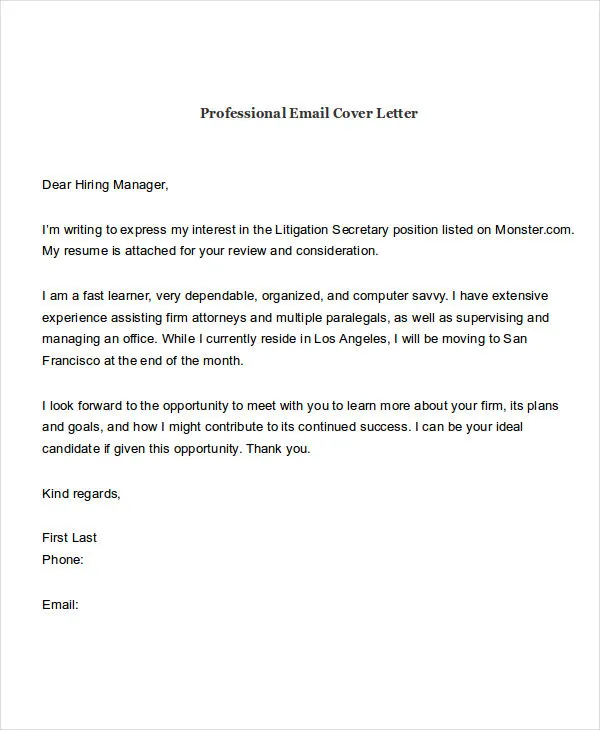
The body of your email provides the context for your cover letter and sets the tone for your application. The first part of your email should include a professional greeting addressed to the hiring manager by name, if possible. Researching the hiring manager’s name shows that you have put in the effort to personalize the email, making a positive first impression. In the following paragraphs, briefly state the position you are applying for and how you learned about it. Mention the key skills or experiences that make you a great fit for the role, and use this space to highlight the value you can bring to the company. Keep the email concise and focused, avoiding unnecessary details. Conclude by expressing your enthusiasm for the opportunity and thanking the recipient for their time and consideration. Include a clear call to action, such as encouraging them to review your attached cover letter and resume. The email body should act as a compelling introduction to your application, creating a sense of anticipation and encouraging the reader to open the attached documents.
Greeting the Hiring Manager
Starting your email with the right greeting is a crucial first step in making a positive impression. Aim to personalize your greeting by addressing the hiring manager by name. This shows that you have taken the time to research and understand the company, demonstrating genuine interest. If you are unable to find the hiring manager’s name, consider using a professional alternative such as “Dear Hiring Manager.” Avoid generic greetings like “To Whom It May Concern,” as they can make your email feel impersonal and lack the professional touch. Ensure the spelling of the name is correct. Always double-check the email’s recipient to avoid any embarrassing mistakes. The greeting should be professional and respectful, setting a positive tone for the rest of your email. Personalizing the greeting from the start tells the hiring manager that you see yourself as a potential fit for the company.
Highlighting Key Skills and Experiences

In the body of your email, it’s crucial to highlight your key skills and experiences relevant to the job you’re applying for. Focus on the specific qualifications that align with the job requirements, emphasizing what makes you a strong candidate. Instead of simply listing your skills, provide concise examples of how you have successfully used them in the past. This helps the hiring manager understand your capabilities in a practical context. Quantify your achievements whenever possible. Using numbers and data to illustrate your accomplishments adds credibility and provides concrete evidence of your contributions. Tailor this section to the specific requirements of the job description, demonstrating that you understand the role and the company’s needs. By highlighting the right skills and experiences, you make it easier for the hiring manager to see the value you can bring to the team and increases the chances of your application standing out from the crowd.
Adding a Call to Action
A call to action (CTA) is an essential element in your email, guiding the hiring manager toward the next step and increasing the chances of them taking action. In the email body, a well-crafted CTA encourages the recipient to review your attached cover letter and resume. Clearly state your interest in the position and your eagerness to discuss your qualifications further. Consider including a sentence that explicitly asks the hiring manager to contact you to schedule an interview or for more information. Make the CTA direct and easy to understand. A straightforward CTA makes it clear to the hiring manager what they should do next and shows that you’re proactive and eager to move forward in the hiring process. The goal is to guide the hiring manager toward the next step, showing confidence and professionalism.
Proofreading and Editing Your Email
Proofreading and editing are essential steps to ensure your email is free of errors and presents you as a polished candidate. Before sending your email, carefully read through the entire message, paying close attention to grammar, spelling, punctuation, and sentence structure. Errors can undermine your credibility and make you appear unprofessional. It is worth reading it out loud, as this method helps you catch any awkward phrasing or typos you might have missed. Check the email for consistency in formatting, ensuring the font, spacing, and other elements are uniform. Proofread your email multiple times. Each time, you can focus on a different aspect. Have a trusted friend or colleague review your email to get a fresh perspective and catch any errors you may have overlooked. The extra time spent proofreading will increase your credibility and increase your chances of making a good first impression.
Checking for Errors

When checking for errors, start by paying attention to spelling and grammar. Use a spell checker, but don’t rely on it completely, as it won’t catch all errors. Pay close attention to homophones (words that sound alike but have different meanings) like “there,” “their,” and “they’re,” as these are common sources of mistakes. Ensure your punctuation is correct and consistent. Pay attention to the use of commas, periods, semicolons, and apostrophes. Review the structure of your sentences, making sure they are clear, concise, and easy to understand. Avoid overly long or complex sentences that can confuse the reader. Check all names, job titles, and company details for accuracy. Even a small mistake can undermine your credibility. Always double-check links and attachments to make sure they work correctly. Taking the time to meticulously check for errors ensures that your email looks professional, and increases your chances of getting a positive response.
Testing the Email Before Sending
Before sending your email, test it to ensure it appears correctly and functions as intended on the recipient’s end. First, send a test email to yourself to check how the email looks. This allows you to verify the formatting, layout, and overall appearance of your email. Ensure that the font, spacing, and images display as intended. Test the email on different devices and email clients. Emails look different across various devices. By testing on different platforms, you can catch any display issues. This also helps you catch any broken links or attachment problems. Double-check that the attachments open correctly and contain the right content. After you’ve made sure everything is functioning properly, you can send it to your prospective employer. By testing your email, you can minimize any potential technical glitches that might negatively impact your application.
Sending Your Cover Letter Email
The actual act of sending your cover letter email is a simple process, but attention to detail is critical. Double-check the recipient’s email address to avoid sending it to the wrong person or address. Make sure the subject line is correct and that it accurately reflects the content of your email. Attach your cover letter and resume as separate documents. As mentioned earlier, a PDF format is recommended for both documents to preserve the formatting. Finally, review the body of your email, ensuring that you have included all the necessary information, that it is free of errors, and that it includes a call to action. Once you’re certain everything is correct, you can click the send button. It’s a good idea to keep a copy of the sent email for your records. This way, you’ll have a record of what you sent and when, which could be useful for future reference. Sending your cover letter email with precision increases your chances of making a positive impression and progressing in the hiring process.
Timing is Key

Timing plays a vital role in your job search strategy, and it is important to send your cover letter email at the right time. While there is no one-size-fits-all answer, sending your email early in the week, typically Monday or Tuesday, tends to be a good strategy. Hiring managers are often less busy at the beginning of the week and are more likely to review new applications. Consider the time of day. Aim to send your email during business hours (between 9 AM and 5 PM) when the hiring manager is likely to be actively checking their emails. Avoid sending your email late at night or early in the morning, as it might get buried in their inbox. Consider any specific deadlines mentioned in the job posting. Apply before the deadline and plan to send it a few days before it. This gives the hiring manager adequate time to review your application. Being mindful of the timing increases your chances of your email being seen and considered promptly.
Following Up Appropriately
Following up on your cover letter email shows your continued interest in the role and your commitment to the application process. Wait at least one week before sending a follow-up email. This gives the hiring manager adequate time to review your application. Keep your follow-up email brief and polite. In the email, reference the position you applied for and briefly reiterate your interest. If you haven’t received a response, ask if they have had a chance to review your application and if they have any questions. Avoid being overly persistent or demanding. A single, polite follow-up is often enough. If you still don’t receive a response after the second email, it’s best to move on. Following up shows your enthusiasm but be sure to respect the hiring manager’s time and decision. This is not an indication that you are not fit for the role.